> ## Documentation Index
> Fetch the complete documentation index at: https://docs.hyperbolic.ai/docs/llms.txt
> Use this file to discover all available pages before exploring further.
# Reserved Getting Started
> Reserve GPU capacity in a few steps, self-serve through the app
Reserving capacity works just like launching an On-Demand instance, using the same app and the same flow. Choose a fixed reservation term, pay up front, and lock in the capacity at a discounted rate.
## Reserve an instance
Log in to Hyperbolic and select **GPUs** from the navigation. Browse the GPU capacity currently available in the platform.
Don't see the capacity you need? [Contact Sales](mailto:sales@hyperbolic.ai) for additional capacity.
Select the GPU type you want and select the GPU Count. Available reservation terms and discounted rates will appear below.
Longer reservation terms have lower rates.
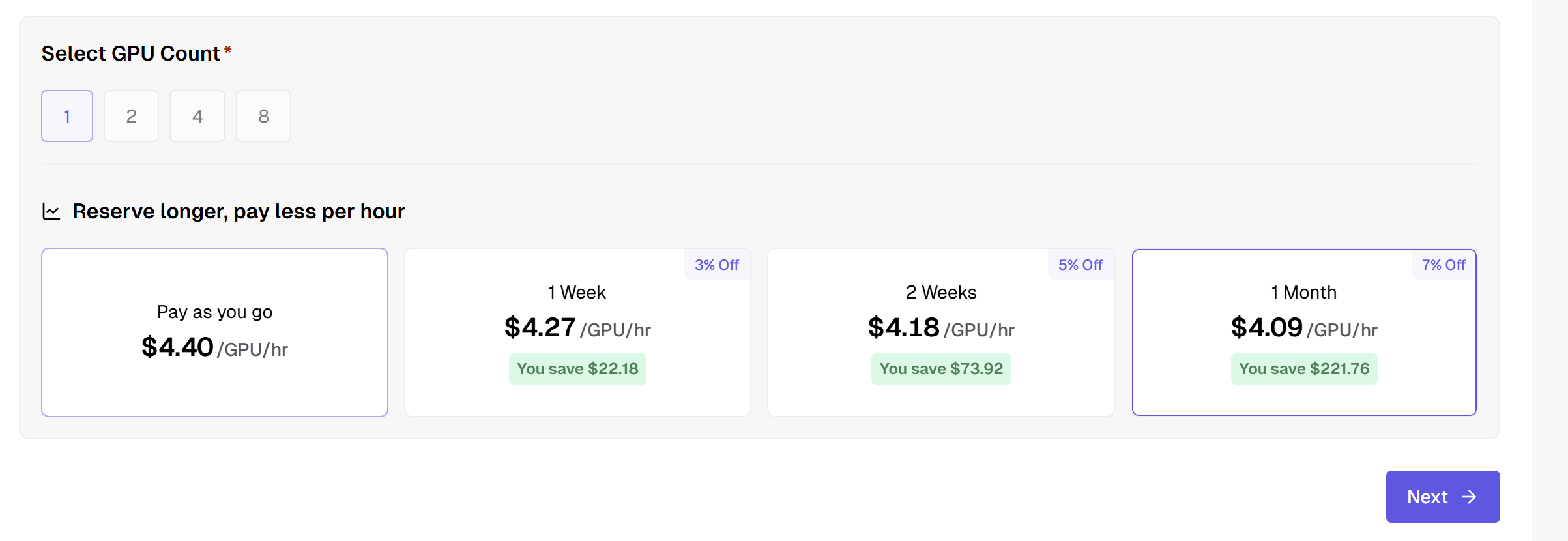 Choose the reservation length that works for your workload. Review the rate and reservation details, then continue to the **SSH Public Key** step.
Reserved instances are paid up front, so your balance must cover the full reservation cost.
Enter your SSH public key and complete the instance configuration.
When you're ready, click **Start Building** to create your reserved instance.
Your reservation begins when the instance is ready and runs for the full reservation term. The instance is automatically terminated when the reservation ends.
Save any data you need to persistent storage before the end of your reservation.
Have a large or long-term commitment? You can also work with our team directly. [Contact sales](mailto:sales@hyperbolic.ai) to discuss volume pricing and terms.
Need dedicated, single-tenant infrastructure custom-built for your team instead? See [Private Cloud](/docs/private-cloud/overview).
Choose the reservation length that works for your workload. Review the rate and reservation details, then continue to the **SSH Public Key** step.
Reserved instances are paid up front, so your balance must cover the full reservation cost.
Enter your SSH public key and complete the instance configuration.
When you're ready, click **Start Building** to create your reserved instance.
Your reservation begins when the instance is ready and runs for the full reservation term. The instance is automatically terminated when the reservation ends.
Save any data you need to persistent storage before the end of your reservation.
Have a large or long-term commitment? You can also work with our team directly. [Contact sales](mailto:sales@hyperbolic.ai) to discuss volume pricing and terms.
Need dedicated, single-tenant infrastructure custom-built for your team instead? See [Private Cloud](/docs/private-cloud/overview).