> ## Documentation Index
> Fetch the complete documentation index at: https://docs.hyperbolic.ai/docs/llms.txt
> Use this file to discover all available pages before exploring further.
# Organizations
> Share a workspace, billing balance, and infrastructure with your team
Organizations let a team share access to the same workspace, billing balance, and infrastructure. Instead of teammates renting GPUs from separate personal accounts, everyone works from one shared account with shared funds and shared visibility into running instances.
## When to use an Organization
* Your team shares a compute budget and wants one balance to fund and monitor
* Multiple people need to launch, monitor, or terminate the same instances
* You want infrastructure to survive personnel changes rather than living in one person's personal account
## Create or join an Organization
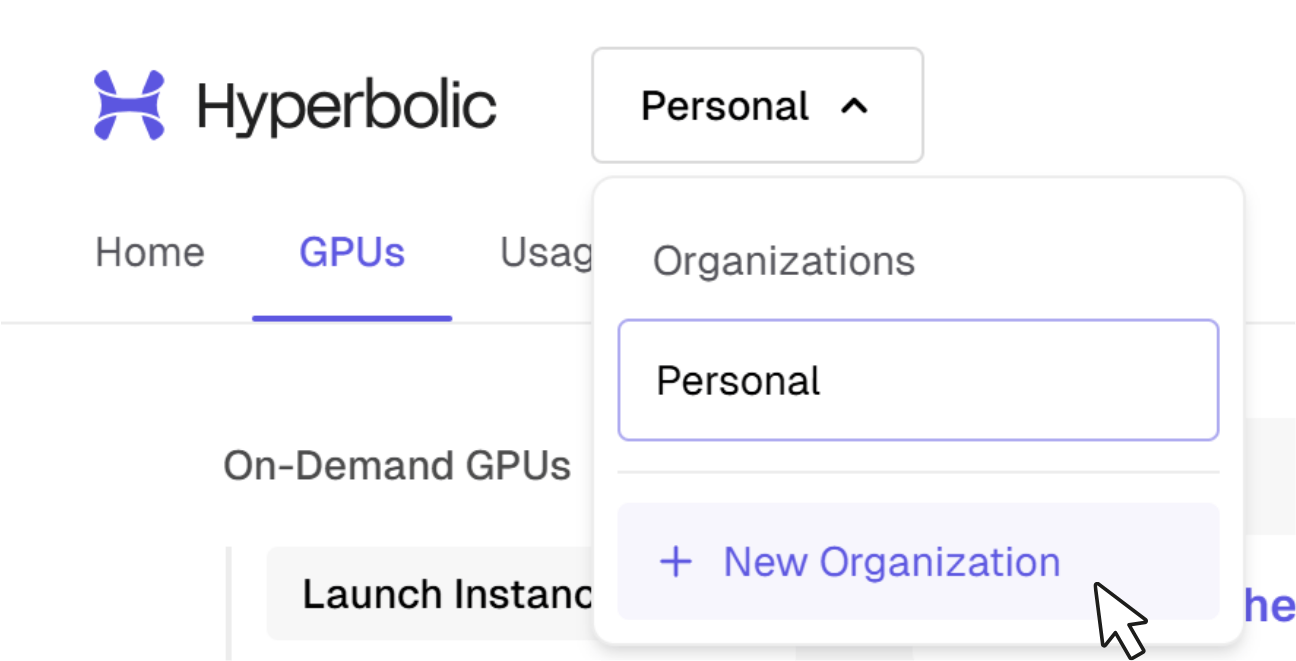
1. Open the **top-left menu** in your [dashboard](https://app.hyperbolic.ai) — you'll see your Personal workspace and a **New Organization** option.
2. Create the Organization, then **invite your teammates** by email.
3. Switch between your Personal workspace and Organizations from the same menu at any time.
 Create or join your Organization **before** launching workloads, so instances and billing live in the shared workspace from the start.
## Billing
An Organization has its own balance, separate from members' personal balances. Deposits made to the Organization fund all instances and storage launched within it. [Auto Top-Up](/docs/general/auto-top-up) can be configured per workspace.
Create or join your Organization **before** launching workloads, so instances and billing live in the shared workspace from the start.
## Billing
An Organization has its own balance, separate from members' personal balances. Deposits made to the Organization fund all instances and storage launched within it. [Auto Top-Up](/docs/general/auto-top-up) can be configured per workspace.